 Himanshi Sharma
TL;DR
Virtual event content repurposing turns long recordings into highlight reels, short clips, speaker videos, and social media posts. The process involves identifying valuable moments, editing content for different platforms, and using AI to simplify transcription, clipping, and captioning. Tracking content performance helps businesses understand audience engagement and improve their repurposing strategy.
Introduction
A virtual event recording can contain an expert’s most valuable industry insight, a detailed product demonstration, or a panel discussion that answers questions potential customers are already asking. Yet, when all this information remains in a one- or two-hour recording, audiences have to search through the entire session to find what interests them.
The viewing landscape also supports distributing video across different formats. According to the Federal Communications Commission (FCC), 57% of U.S. adults watched video on devices other than televisions in 2023. The figure increased to 81% among adults aged 18–34 who watched video on non-TV devices.
For businesses hosting webinars, virtual conferences, and online presentations, this makes recorded sessions an opportunity to create content beyond full-length replays. Virtual event content repurposing allows teams to extract meaningful discussions and turn them into event highlights, speaker-specific clips, short educational videos, and social media content. The challenge is knowing which moments to select, how to edit them without losing their original meaning, and where to distribute each format.
Why Virtual Event Recordings Are Valuable Content Assets
A recorded virtual event contains more than a presentation or a discussion. It captures expert knowledge, audience interactions, business announcements, and information that can support future marketing activities.
With virtual event content repurposing, businesses can extend the usefulness of these recordings without organizing another event or creating every piece of content from scratch.
Here are five types of content worth identifying:
- Speaker insights: Turn expert opinions, recommendations, and industry observations into short educational videos.
- Panel discussions: Extract interesting questions, contrasting viewpoints, and important takeaways.
- Product demonstrations: Create focused videos explaining product features, applications, and solutions.
- Audience questions: Share useful answers from speakers to address common customer concerns.
- Key announcements: Highlight important company updates, product launches, or business developments.
For example, a one-hour webinar about marketing automation might contain separate discussions about lead generation, campaign planning, and customer engagement. Each topic can become an independent content asset for a different audience.
What Content Can You Create From a Single Virtual Event Recording?
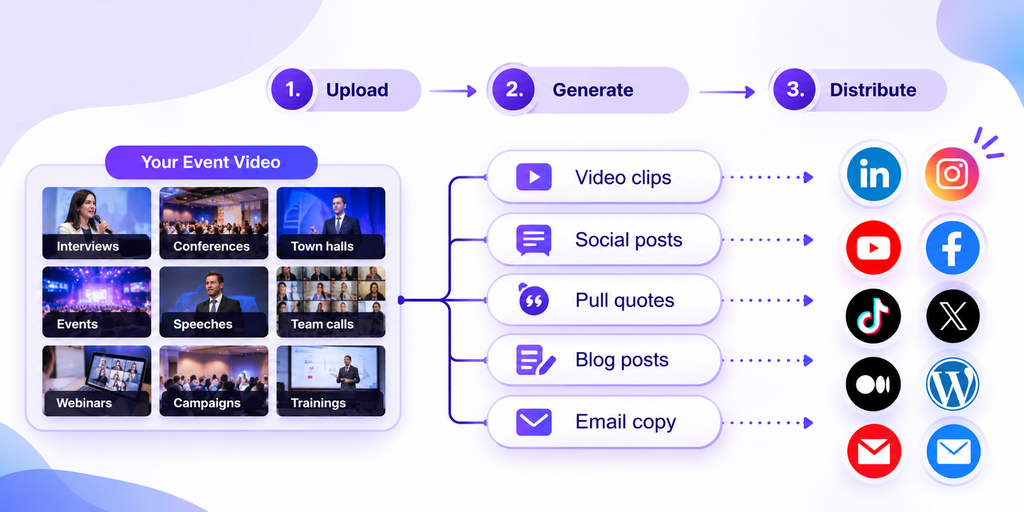
Once you identify useful material, consider which formats will make it easier for your audience to consume and share. A single recording can support several content types, depending on the information available and the channels where you plan to publish it.
The following table explains how teams can adapt recorded discussions into different assets.
| Content format | How to create it | Where to publish |
| Event highlight reels | Combine important moments from different sessions | Website, YouTube |
| Short-form videos | Extract focused speaker discussions | Instagram, LinkedIn, YouTube Shorts |
| Speaker-specific clips | Select valuable statements from individual speakers | LinkedIn, YouTube |
| Quote-based posts | Convert memorable statements into visual graphics | Instagram, LinkedIn |
| Carousal posts | Present key takeaways through multiple slides | Website, blogs |
| Educational content | Turn practical tips into short videos or guides | Social media, website |
| Email content | Include relevant session highlights and important announcements | Email newsletters |
| Event promotions | Reuse memorable moments to promote upcoming events | Social media, email |
These formats serve different purposes. For instance, virtual event video highlights can provide a quick overview of an entire session, while individual speaker clips can explain a specific idea in greater detail.
A speaker’s explanation of an industry challenge could become a short video, a quote graphic, and a written takeaway. Each version should present the information in a way that suits its intended channel.
Businesses can also turn one event recording into multiple content assets by organizing extracted information around different topics and audience interests.
How to Repurpose Virtual Event Recordings Into Multiple Content Formats
Creating useful content from existing recordings requires a clear process. Following these steps helps marketing teams identify valuable information, prepare different formats, and distribute them consistently.
1. Organize and Review the Original Recording
Start by collecting the recordings from your virtual event. Organize them according to session names, speakers, topics, and event dates.
If the event includes multiple presentations or panel discussions, keep each recording separate to make content selection easier.
Before editing, check:
- Video and audio quality.
- Speaker visibility and sound clarity.
- Recording completeness.
- Availability of presentation slides and transcripts.
- Speaker permissions for further distribution.
Also, note the session duration and speaker details. These details help editors locate the right recording when preparing content later.
2. Identify Valuable Moments and Discussion Topics
The next step is to find sections that contain useful information.
Watching an entire recording repeatedly can consume considerable time, especially when an event includes multiple speakers and sessions. A transcript can make this process easier because editors can search for specific topics, statements, and questions without repeatedly reviewing the complete video.
For example, a panel discussion about business technology might include separate conversations about automation, customer experience, and operational challenges.
Create a list of moments worth extracting, such as:
- Important speaker statements.
- Practical recommendations.
- Interesting audience questions.
- Product announcements.
- Industry-related insights.
- Memorable panel discussions.
For a closer look at why valuable event footage often goes unused and how AI can help teams identify reusable moments, explore why event video content goes to waste and how AI can repurpose it.
3. Select Clips According to Audience Interests
Not every interesting discussion will make a suitable social media video. Select moments according to the people you want to reach and the purpose of your content.
Before extracting a section, consider these questions:
- Does the speaker communicate one complete idea?
- Does the discussion provide a useful takeaway?
- Can viewers understand the clip without watching the entire session?
- Does the opening give viewers a reason to continue watching?
- Is the topic relevant to the intended audience?
For example:
- Marketing professionals: Actionable campaign recommendations and lead generation strategies.
- Business leaders: Industry trends, expert opinions, and operational insights.
- Potential customers: Product demonstrations and solution explanations.
- Employees: Leadership updates, internal announcements, and training discussions.
Each selected section should communicate one clear message. Avoid combining unrelated discussions simply to create a longer video.
4. Create Highlights and Shorter Video Segments
Once you have identified the relevant sections, start extracting them from the original recording.
There are two useful approaches:
Create an event highlight reel: Combine important moments from multiple sessions to give viewers a quick overview of the event. Include keynote insights, panel discussions, announcements, and memorable interactions.
Create individual short clips: Extract specific discussions that communicate one idea, such as an expert recommendation, an audience question, or a product explanation.
For effective virtual event recording highlights, consider including:
- A short opening that introduces the topic.
- The most relevant speaker statement.
- Supporting visuals, where available.
- A closing takeaway or relevant next step.
For social distribution, shorter clips should communicate their main message quickly. However, do not remove important context just to reduce video length. A good clip should feel like a complete discussion rather than an unfinished section taken from a longer presentation.
5. Add Captions, Titles, and Context
Many viewers watch social videos without sound, so captions help them understand the discussion.
Add accurate subtitles, speaker names, and descriptive titles to make the content easier to follow. If a clip begins in the middle of a discussion, include a short introduction or on-screen context so viewers understand what the speaker is addressing.
Before publishing, check:
- Spelling and speaker names.
- Caption timing and readability.
- Important terminology and technical terms.
- Background audio and sound levels.
- Text placement and brand consistency.
- Accuracy of direct quotations.
Avoid adding captions that change the speaker’s meaning or presenting an AI-generated paraphrase as an exact quotation.
6. Adapt Content for Different Social Media Channels
A single recording may need different editing treatments depending on the publishing platform. Vertical videos are suitable for mobile-first short-form formats, while horizontal videos can work better for longer presentations and website content.
YouTube’s official guide to creating Shorts recommends a vertical 9:16 format and emphasizes communicating the message quickly.
Consider the following distribution approach:
| Platform | Recommended content | Editing consideration |
| Professional insights, leadership discussions, and industry-related clips | Keep the message focused and provide context | |
| Short speaker videos, event highlights, and visual takeaways | Use vertical layouts and readable captions | |
| YouTube | Shorts and longer session highlights | Use vertical or horizontal formats according to the content |
| Website | Complete recordings, recaps, and educational videos | Organize videos by topic and session |
| Relevant clips and session takeaways | Use a clear thumbnail and link to the video |
The same recording does not need to be published identically everywhere. Adapt its presentation while preserving the original message. This makes virtual event video clips more relevant to their intended audiences.
7. Publish and Distribute Content Consistently
Avoid publishing every extracted video immediately after the event. Prepare a content calendar that distributes useful discussions over several days or weeks.
For example:
| Publishing period | Suggested content |
| Immediately after the event | Main event highlights |
| Following 2–3 days | Speaker-specific clips |
| Following week | Educational snippets and key takeaways |
| Following 2 weeks | Blog summaries and email content |
| Before the next event | Previous event highlights and promotional clips |
This is an illustrative schedule, not a fixed publishing rule. Adjust it according to your audience’s interests, campaign priorities, and the relevance of each discussion.
You can also organize content around specific themes rather than publishing clips strictly in the order they appeared during the event.
8. Track Performance and Identify Opportunities
Publishing content is only one part of the process. You should also understand how audiences respond to it.
Monitor relevant performance indicators, including:
- Video views: Understand how many people have watched the content.
- Watch time: Evaluate how much time viewers spend watching a video.
- Audience retention: Identify where viewers continue watching or leave.
- Likes, comments, and shares: Understand which discussions encourage interaction.
- Click-through rates: Measure whether videos encourage viewers to visit another resource.
- Website visits: Evaluate whether repurposed content brings visitors to relevant pages.
Since platforms may define views and engagement differently, compare performance using each platform’s reporting criteria.
Use these insights to make better content decisions. For example, if speaker-specific clips receive stronger engagement than general event recaps, consider extracting more topic-focused discussions from future recordings.
This helps teams improve their virtual event content repurposing strategy based on actual audience responses rather than simply increasing the number of published videos.
How AI Makes Virtual Event Video Repurposing Easier
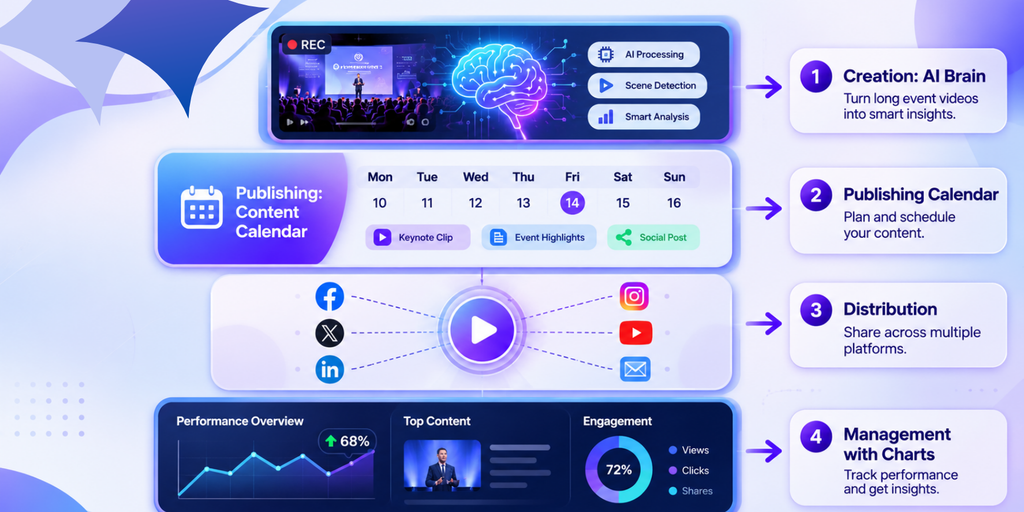
Manually reviewing lengthy recordings, finding important discussions, and editing multiple clips can slow down post-event marketing. AI-assisted tools can reduce repetitive tasks and help teams prepare content more efficiently.
Here are some ways AI can support the workflow:
| AI capability | How it supports repurposing |
| Transcription | Makes recordings searchable so editors can locate specific topics and statements |
| Important moment detection | Suggests sections that may contain useful highlights for editors to review |
| Automated clipping | Extracts selected portions of longer recordings into shorter video segments |
| Summary generation | Helps identify session takeaways and additional content opportunities |
| Caption generation | Produces subtitles that editors can review and correct |
| Content organization | Groups clips and summaries by session, speaker, or topic where supported |
An AI virtual event video workflow can reduce repetitive editing and content preparation tasks, but automation should not replace editorial judgment.
The NIST Generative AI Profile provides guidance on identifying and managing risks associated with generative AI. For event teams, this reinforces the importance of evaluating AI-generated outputs before using them.
Review every generated clip for accuracy, speaker context, missing information, and brand suitability before distribution. AI capabilities also vary by tool, so check which features are available before choosing a solution.
Best Practices for Sharing Repurposed Virtual Event Content
Creating multiple assets is useful only when each piece communicates information clearly and reaches the right audience.
Follow these recommendations to improve the quality of your content:
| Do’s | Don’ts |
| Confirm speaker permissions and distribution rights | Publish recordings without the necessary rights |
| Check company names, product details, and factual claims | Share unverified information |
| Maintain consistent branding across content formats | Use inconsistent logos, fonts, or visual styles |
| Add a relevant next step when it supports the content’s purpose | Remove important context |
| Keep the original recording available for viewers who want more detail | Treat short clips as a replacement for the complete session |
A strong virtual event content repurposing strategy prioritizes accuracy, relevance, and a clear purpose for every asset rather than simply increasing the number of clips produced.
How Snipin AI Helps Repurpose Virtual Event Recordings
For teams managing frequent webinars and virtual events, manually finding and preparing useful moments can become a recurring challenge.
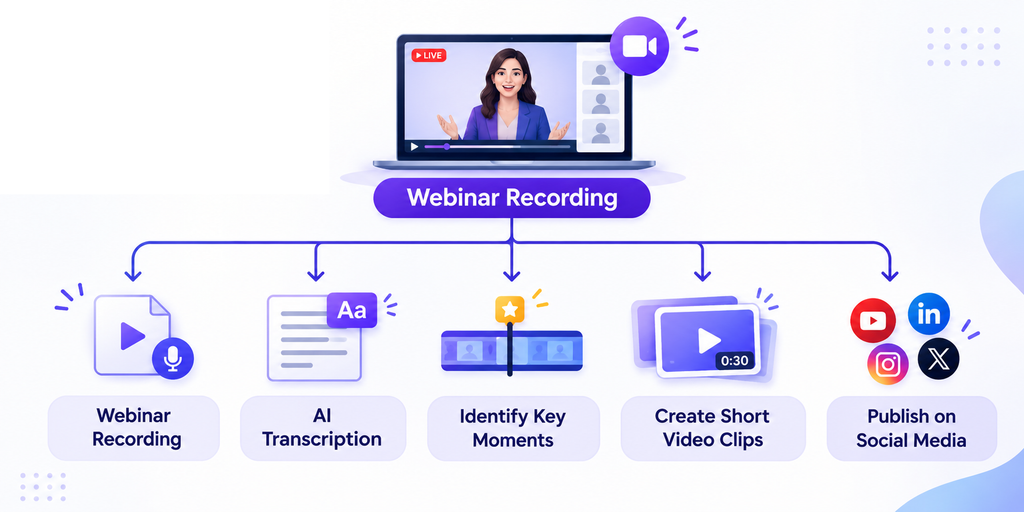
Snipin AI’s Webinars & Virtual Events solution helps teams turn long recordings into highlights, short clips, summaries, and takeaways. Its workflow includes uploading recordings, AI-assisted moment detection, snippet creation, and sharing or tracking the resulting content.
Teams can also review and approve generated clips before publishing.
For internal leadership discussions and employee communication, its separate Townhalls solution supports extracting leadership highlights, key announcements, clips, and summaries from townhall recordings. Teams can review the outputs and share them through an internal microsite.
These solutions address different recording needs, helping businesses organize webinar, virtual event, and internal townhall content into more accessible resources.
Make Every Virtual Event Recording Count Beyond the Event
A virtual event recording can support much more than a full-length replay. Its discussions, expert insights, and important announcements can become useful resources for social media, educational content, email campaigns, and future event promotions.
With a planned virtual event content repurposing workflow, businesses can identify meaningful discussions, create different content formats, and distribute them according to audience interests.
The objective is to make every valuable discussion easier to discover, understand, and share while maintaining the original message and context.
Frequently Asked Questions
How do you repurpose a virtual event recording?
Extract useful discussions and turn them into short videos, speaker clips, summaries, and social media posts.
How do you create highlights from a virtual event?
Combine key speaker statements, panel discussions, and announcements into an event recap or individual clips.
How can AI turn virtual event recordings into short clips?
AI can transcribe recordings, identify key moments, suggest highlights, and generate clips, summaries, and captions.
What content can you create from a virtual event recording?
Create highlight reels, short videos, speaker clips, quote graphics, carousels, blog posts, and email content.

 Mohi • January 30, 2026 • 8 min read
 Arun • November 20, 2026 • 7 min read