 Himanshi Sharma
TL;DR
An AI video recap for events helps turn hours of event footage into useful, shareable content without making post-event production unnecessarily slow. AI can help identify key moments, create shorter clips, organize footage, and repurpose content for different channels. For event marketers, this means one event can continue generating content and engagement long after it ends.
Introduction
Think about everything captured at a major event: keynote sessions, panel discussions, speaker interviews, attendee reactions, product demonstrations, networking moments, and behind-the-scenes footage. By the end of the event, there may be hours of video sitting on storage drives.
The challenge is not capturing the footage. It is turning that footage into useful content quickly.
That is where an AI video recap for events can help.
AI can scan long recordings, identify potential highlights, create shorter clips, generate transcripts, and support different versions of the same content. Instead of manually searching through every recording, event teams can start with AI-generated suggestions and focus their time on reviewing, editing, and shaping the final story.
This is part of a wider shift toward AI-assisted business workflows. The UK Government’s 2026 Business Data Survey found that 41% of UK businesses that handled digitised data reported using AI for at least one purpose in 2025–26. The survey also found that 28% of AI-using businesses used AI for researching information, while 21% used it to summarise or collect in-house information or draft reports and correspondence. For event marketers, the same idea can be applied to one of their biggest sources of content: event video.
What Is an AI Video Recap for Events?
An AI video recap for events uses AI-assisted tools to help turn raw event footage into a shorter recap or multiple pieces of post-event content.
Depending on the tool and workflow, AI can help with:
- Finding important moments in long recordings
- Identifying topics or sections within a session
- Creating shorter video clips
- Generating transcripts and captions
- Organizing footage by speaker or topic
- Repurposing recordings into different formats
- Speeding up repetitive editing tasks
The process typically starts with event footage. AI identifies potential highlights, a human reviews them, and approved clips are then edited, branded, and prepared for publishing.
The human step still matters. AI can help find and organize content, but event teams should decide what best represents the event, brand, speakers, and audience.
Why AI Video Recaps Are Becoming Important for Event Marketing
1. Extend the Life of Your Event
The value of an event should not disappear when attendees leave the venue.
A good event recap video can bring the experience back to people who attended and introduce the event to people who missed it. Short clips can also keep conversations going across social media, email, websites, and other channels.
Instead of one event producing content for one day, the same footage can support weeks of post-event content.
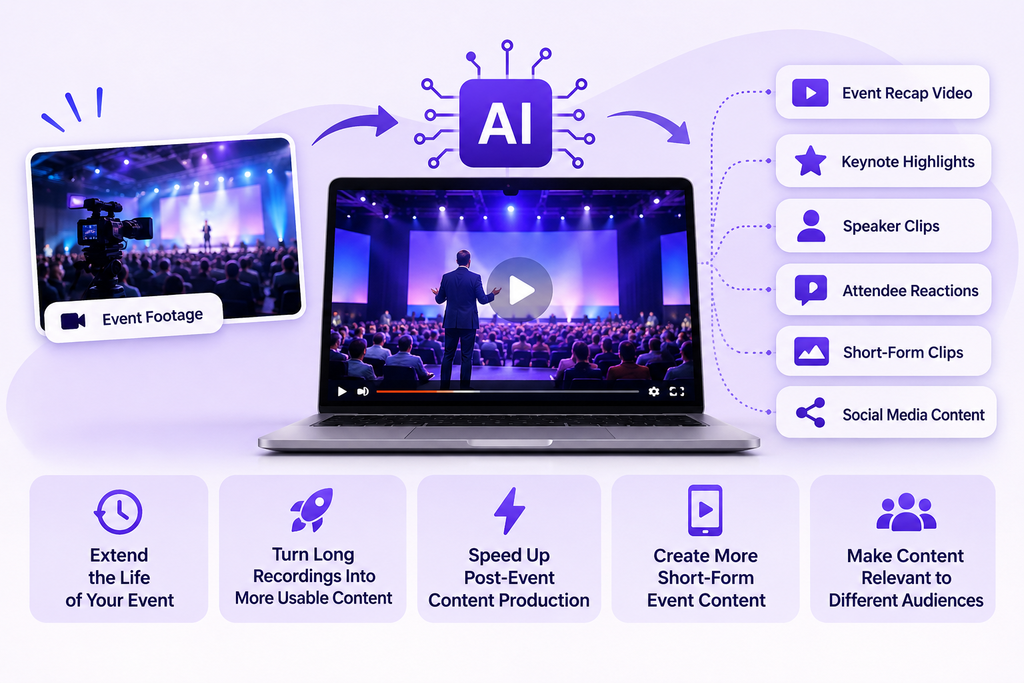
For example, an event could generate:
- A main recap video
- Keynote highlights
- Speaker clips
- Attendee reactions
- Behind-the-scenes videos
- Short educational clips
- Social media content
The event becomes a continuing source of content rather than a single marketing moment.
2. Turn Long Recordings Into More Usable Content
A one-hour keynote may contain only a few moments that are ideal for social media.
Finding those moments manually can take considerable time. AI can help identify sections that may work as standalone clips, giving editors a starting point instead of making them search through the entire recording from scratch.
This is where content repurposing becomes useful.
One panel can become several short clips. One interview can become multiple topic-focused videos. One keynote can provide several event highlights.
The UK’s government-backed Business Academy also identifies AI-assisted content repurposing and creative asset production as practical marketing applications.
3. Speed Up Post-Event Content Production
Post-event marketing often has a timing problem.
The longer it takes to review and edit footage, the longer it takes to publish the content. By then, the event may no longer feel as fresh to the audience.
AI can shorten some of the early production tasks by helping teams find potential highlights, generate transcripts, and prepare clips for editing.
That does not mean removing editors from the process. It gives them a faster starting point and allows them to spend more time on creative decisions, brand alignment, and final quality.
4. Create More Short-Form Event Content
Not everyone who sees an event video wants to watch the full recording.
Short-form video gives marketers another way to share useful moments without asking viewers to commit to a long session.
A single event can provide short videos featuring:
- A strong speaker quote
- A useful audience question
- A key takeaway
- A product demonstration
- An attendee reaction
- A memorable event moment
These clips can support social media marketing and other digital campaigns.
The goal is not to shorten every video. It is to identify the moments that work best in shorter formats.
5. Make Event Content More Relevant to Different Audiences
One event can attract several types of audiences, and they may not all care about the same content.
A potential customer might want a product demonstration. An industry professional may be more interested in a technical panel. A senior executive may prefer strategic insights from a keynote.
Instead of sending everyone the same generic recap, marketers can organize footage around different topics and audience interests.
This creates opportunities for more relevant personalized video content and gives teams more ways to use the same event footage.
How to Repurpose an Event Recap Across Marketing Channels
An event recap does not have to be published as one finished video. The same event footage can be adapted for different channels, audiences, and stages of the marketing journey.
| Channel | Content opportunity |
| Social media | Short speaker clips, event highlights, attendee reactions, and key takeaways |
| Email marketing | Event recap videos, session highlights, and speaker moments |
| Website | Main event recap, customer stories, and key session clips |
| Sales follow-up | Product demonstrations, expert insights, and customer conversations |
| Future event promotion | Previous-event highlights, attendee experiences, and speaker moments |
| Content marketing | Educational clips, expert quotes, and topic-based videos |
This makes content repurposing more strategic. Instead of creating one recap and considering the job finished, event teams can adapt the strongest moments for different marketing purposes.
For example, a keynote can become a short social clip, an email highlight, a website video, or a longer educational asset. AI can help identify and prepare these moments, while marketers decide which version fits each channel and audience.
How to Measure and Review an AI Video Recap
Creating more videos does not automatically mean better marketing. Event teams should track views, watch time, engagement, shares, clicks, website visits, and conversions where relevant.
If clips from a particular session consistently perform well, those audience insights can help guide future content decisions.
The UK Government’s 2026 Business Data Survey found that 37% of AI-using businesses analysed data, compared with 17% of businesses that did not use AI. For event marketers, the practical takeaway is to measure what audiences respond to and use those insights to improve future content.
Before publishing, teams should also review:
- Accuracy: Check names, quotes, captions, statistics, and AI-generated transcripts.
- Privacy and permissions: Ensure footage is recorded and used according to applicable permissions and privacy requirements.
- AI transparency: If AI significantly generates or modifies content, consider appropriate provenance, metadata, watermarking, authentication, or labeling.
- Accessibility: Review AI-generated captions for accuracy and ensure videos meet applicable accessibility requirements.
A successful AI video recap for events should not only perform well but also be accurate, responsible, accessible, and appropriate for its audience.
Keep the Event Story Going!
An event does not have to stop generating marketing value when the last attendee leaves.
With the right workflow, event footage can continue supporting speaker highlights, attendee reactions, educational clips, short-form videos, social content, and follow-up campaigns. An AI video recap for events can make that process more efficient by helping teams find useful moments and repurpose existing footage.
The most effective approach is simple: let AI handle repetitive work while people handle the story.
That balance can help event marketers get more value from the content they have already captured and keep the event conversation going long after the venue has emptied.
Frequently Asked Questions
How can event footage be repurposed after an event?
Event footage can be repurposed into social media clips, speaker highlights, email content, website videos, educational content, sales assets, and promotional videos for future events. AI can help identify and prepare suitable moments for each format.
How can AI video recaps help event marketers?
AI video recaps can help event marketers find useful moments faster, create more short-form content, repurpose event footage, and keep audiences engaged after the event. They can also support social media, email, website, and other marketing campaigns.
What can you include in an event recap video?
An event recap video can include keynote highlights, speaker clips, attendee reactions, panel discussions, product demonstrations, networking moments, behind-the-scenes footage, and memorable moments from the event.
What is an AI video recap for events?
An AI video recap for events uses AI-assisted tools to identify important moments from event footage and turn them into recap videos, short clips, highlights, and other post-event content.

 Mohi • March 27, 2026 • 8 min read
 Arun • March 18, 2026 • 8 min read