
 Himanshi Sharma
TL;DR
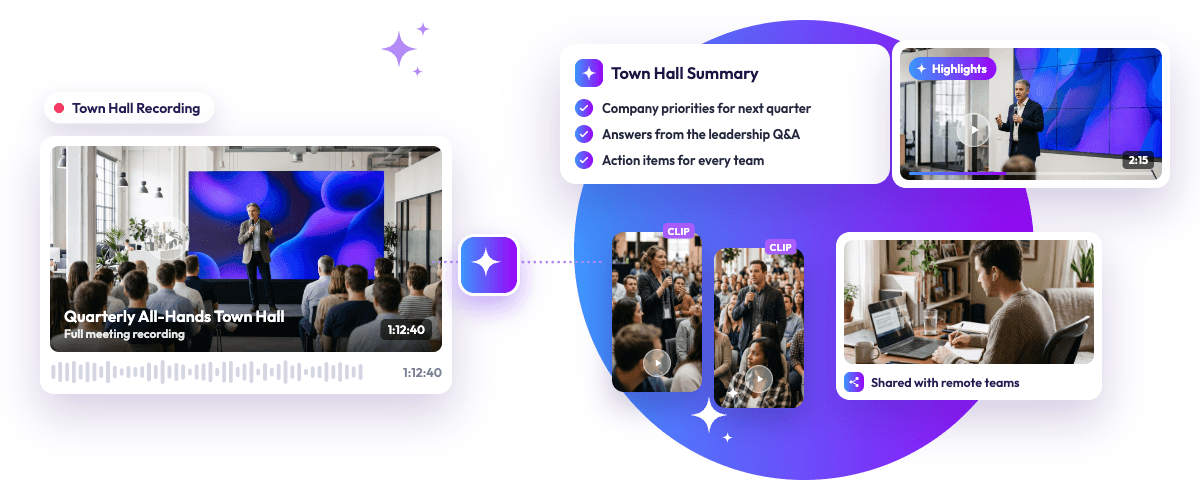
Repurposing town hall meeting video recordings helps organizations turn lengthy meetings into concise summaries, video highlights, and short clips employees can access when needed. The process involves reviewing the recording, identifying important discussions, preparing written takeaways, extracting relevant video moments, and organizing the final content for sharing. AI tools can simplify these tasks, while human review helps ensure that every output accurately represents the original discussion.
Introduction
Town hall meetings give employees an opportunity to hear directly from leadership, understand company updates, and ask questions about important decisions. However, sharing a recording after the meeting does not always mean everyone will watch it or find the information they need.
The importance of clear internal communication is also reflected in the U.S. Office of Personnel Management’s (OPM) 2024 Federal Employee Viewpoint Survey. According to its 2024 Governmentwide Management Report, only 56% of federal employees gave a positive response when asked whether they were satisfied with the information they received from management about what was happening in their organization. While this finding relates specifically to the U.S. federal workforce, it highlights the importance of making organizational updates clear and accessible.
One way to do this is by making town hall content easier to revisit. Instead of expecting employees to watch an entire recording, organizations can turn it into different content formats. Written summaries capture the main takeaways, video highlights showcase significant moments, and short clips make individual announcements or discussions easier to access.
A well-organized town hall meeting video also lets employees revisit important announcements without going through the entire session. The process starts with one recording. Here’s how to turn it into useful content without losing the context of the original meeting.
How to Repurpose Town Hall Meeting Recordings: A Step-by-Step Process
Before starting, understand the difference between the three main outputs:
- Summaries: Written overviews of the meeting’s key discussions, announcements, and decisions.
- Highlights: Selected video moments that capture the most significant parts of the meeting.
- Short clips: Individual video segments focused on a specific announcement, speaker, question, or discussion.
You can create all three from the same recording by following these steps.
1. Review the Recording and Identify Key Discussions
Start by reviewing the full town hall recording or its agenda. Your first task is to understand the meeting’s structure and identify discussions that employees may want to revisit.
While reviewing the town hall meeting video, pay attention to:
- Leadership messages and important announcements.
- Company performance and departmental updates.
- New policies, initiatives, and upcoming plans.
- Employee questions and leadership responses.
- Important decisions, deadlines, and action items.
Use the meeting agenda, available notes, or timestamps to organize these discussions. For example, if the meeting includes updates from the CEO, HR, and different department heads, create a separate section for each discussion.
This makes it easier to locate specific information when preparing summaries and selecting video moments.
Not every part of a town hall needs to become a separate piece of content. Prioritize discussions that communicate important information, explain a decision, or answer questions employees are likely to have.
2. Transcribe the Recording to Capture Important Information
A transcript gives you a text-based reference for the meeting. Instead of repeatedly watching the entire recording to find a particular announcement or response, you can search the transcript for relevant discussions.
If a transcript is not available, use a suitable transcription tool or prepare one from the recording.
Once you have the transcript:
- Divide the discussion into topics or agenda sections.
- Identify speakers and the subjects they discuss.
- Mark important announcements and explanations.
- Note questions that received detailed responses.
- Record timestamps for discussions you may want to turn into clips.
For example, searching for a term such as “new employee policy” can help you locate the relevant discussion more quickly, provided the transcript captures the term accurately.
Check names, figures, dates, and technical terms against the original recording. This is especially important when the town hall meeting video covers company performance, policy changes, or business decisions.
3. Create a Structured Town Hall Meeting Summary
A town hall meeting summary should give employees a clear understanding of the main discussion points without requiring them to watch the entire session.
Use the transcript and meeting notes to organize the information into a simple structure.
A useful summary can include:
- Meeting overview: Date, purpose, and main discussion topics.
- Leadership announcements: Important messages and updates from company leaders.
- Business updates: Performance highlights, departmental progress, and organizational developments.
- Employee questions: Important questions raised during the session and the responses provided.
- Decisions and action items: Confirmed decisions, next steps, responsible teams, and deadlines, where applicable.
For example, consider a town hall where the CEO announces a new company initiative.
Instead of writing a lengthy account of the entire discussion, summarize it using a few clear points:
Example: New Company Initiative
- What was announced: The company is introducing a new initiative.
- Why it matters: The initiative addresses the business priority explained during the meeting.
- Who is involved: The departments or teams identified by leadership.
- Next steps: The actions and timelines confirmed during the discussion.
This format helps employees understand the announcement quickly while keeping the important details intact.
Avoid adding assumptions or information that speakers did not confirm. If a decision is still under discussion, make that clear rather than presenting it as final.
4. Identify Key Moments for Town Hall Video Highlights
Once the written summary is ready, move on to the video. Town hall highlights should capture important moments that employees may benefit from watching directly.
Go through the recording and mark sections that communicate a complete and useful message. When selecting moments from the town hall meeting video, look for:
Look for moments such as:
- The CEO or leadership team explaining the company’s direction.
- Announcements about new projects or organizational changes.
- Important business milestones and achievements.
- Detailed responses to frequently raised employee questions.
- Discussions explaining major decisions or upcoming initiatives.
For example, if a department head explains how a new initiative will affect different teams, that discussion may work well as a video highlight.
Select the beginning and ending points carefully. A highlight should include enough of the original conversation for viewers to understand what the speaker is discussing.
Avoid combining unrelated statements or removing context just to make a video shorter. The purpose is to make important moments easier to revisit, not to change the original message.
5. Extract Short Clips From Important Discussions
Highlights can bring several significant moments together, while short clips focus on individual discussions.
After marking the relevant sections, extract separate video segments around specific topics.
For example, one town hall recording could produce:
- A short clip featuring the CEO’s opening message.
- A video explaining a new company initiative.
- A clip covering an important departmental update.
- A video answering a frequently asked employee question.
- A highlight featuring a major company milestone.
Keep each clip focused on one main message. Employees should be able to understand what the video covers without needing to watch several other clips first.
When selecting a section, check that:
- The discussion communicates one complete idea.
- The speaker’s message makes sense without lengthy background.
- The clip answers a relevant question or explains an important update.
- The beginning and ending do not remove necessary context.
During editing:
- Remove unnecessary pauses and unrelated sections.
- Retain the speaker’s complete point and original meaning.
- Add a clear title that explains the subject.
- Check the audio and video quality.
- Review captions if they are added during editing.
For instance, a clip titled “What Employees Should Know About the New Policy” tells viewers exactly what to expect. A vague title such as “Town Hall Update” does not provide the same clarity.
6. Review and Organize the Final Content
Before sharing the repurposed content, compare every summary and video clip with the original recording. This final review helps prevent incorrect information, missing context, and editing mistakes from reaching employees.
Use this checklist before publishing:
- Verify names, dates, figures, and company terminology.
- Check that summaries accurately reflect what speakers said.
- Confirm that video clips preserve the original context.
- Remove duplicate or unrelated content.
- Add clear titles and descriptions to each asset.
- Check video and audio quality.
- Review captions, if included.
- Confirm that sensitive information is shared only with the intended audience.
- Organize content by meeting, date, department, or topic.
A simple folder structure can make the final content easier to manage:
| Content category | Example assets |
| Meeting summaries | Leadership updates, business performance, key decisions |
| Video highlights | CEO address, major announcements, employee Q&A |
| Short clips | Departmental updates, individual questions and responses |
| Original recording | Complete town hall video for additional context |
Once everything is approved, store the content in a centralized location. Use consistent file names and labels so employees can find specific announcements or discussions without searching through multiple folders.
How AI Helps Repurpose Town Hall Meeting Recordings
Repurposing recordings manually can take considerable time. Teams may need to review lengthy videos, locate important discussions, prepare written summaries, and edit multiple clips.
AI tools can help reduce this workload by assisting with different parts of the process.
| Repurposing task | How AI can help |
| Finding important moments | Identifies potentially relevant sections of a recording for review |
| Creating summaries | Generates concise overviews and key takeaways |
| Extracting video clips | Helps turn selected moments into shorter video content |
| Organizing content | Helps group summaries and clips around specific topics |
| Preparing content for sharing | Reduces manual work involved in managing finished assets, depending on the tool |
However, AI-generated content should not be published without human review. Generative AI systems can produce confident but incorrect information, a risk described as confabulation in the National Institute of Standards and Technology’s Generative AI Profile.
For town hall recordings, this matters because an inaccurate summary could misrepresent a leadership announcement, company decision, or employee response. Always compare generated content with the original recording and have the appropriate team approve it before sharing.
For a broader look at how AI supports video repurposing across different event formats, explore How AI Event Video Repurposing Transforms Townhalls, Expos, and Virtual Events.
How to Share Repurposed Town Hall Content With Employees
Creating summaries and clips is only part of the process of town hall content repurposing. Employees should also be able to find and access the content when they need it.
Choose a distribution method that fits your organization’s internal communication process.
- Share written summaries through internal channels: Send key takeaways through company email, an intranet, or an employee communication platform.
- Publish video highlights in a central content hub: Keep clips and summaries together so employees can find relevant updates.
- Organize content by department or topic: Use clear categories to make specific announcements and discussions easier to locate.
- Share direct links to relevant clips: Help employees access a particular discussion without searching through the full recording.
- Keep the original recording available: Employees who need more context should still be able to revisit the complete meeting.
Make sure access permissions are appropriate, particularly when recordings contain confidential business information or internal discussions.
Simplify Town Hall Video Repurposing With Snipin AI
Creating summaries and town hall meeting video highlights from lengthy town hall recordings can involve several manual steps. Snipin AI helps simplify this process by turning uploaded town hall recordings into AI-generated clips, summaries, and insights.
Teams can upload their recordings, customize event branding, and use the platform to identify important announcements, leadership insights, employee discussions, and memorable moments. They can then review, edit, approve, or remove generated clips and summaries before publishing.
The platform also supports team collaboration, content downloads, sharing through an internal microsite, and analytics to monitor content engagement. This gives teams a centralized workflow to manage and distribute post-town hall video content.
Explore Snipin AI’s town hall video summarization and highlights solution to learn more about its capabilities.
Make Every Town Hall Recording More Useful!
A town hall recording should remain useful even after the live meeting ends. By turning it into structured summaries, relevant highlights, and short video clips, organizations can make important discussions easier for employees to access and revisit.
Start with the key messages, create content around individual topics, and review every output before sharing. With a consistent workflow and the right AI assistance, teams can make better use of their existing recordings without requiring employees to watch every meeting from beginning to end.
It is also worth keeping these assets organized by meeting date, department, or subject. This makes it easier for employees to find an earlier announcement, revisit a leadership message, or catch up on a discussion they missed. Teams can also reuse relevant clips in internal newsletters, onboarding resources, or future company updates when the information is still current. In this way, one town hall recording can continue supporting internal communication long after the meeting has finished.
Frequently Asked Questions
1. How do you summarize a town hall meeting?
Review the recording or transcript and capture the key announcements, leadership updates, employee questions, decisions, and action items in a concise, organized format.
Can AI summarize town hall meetings?
Yes. An AI town hall summarizer can generate meeting summaries, key takeaways, and video clips from recordings. Always review its output for accuracy before sharing.
How do you repurpose a town hall recording?
Turn the recording into written summaries, video highlights, and short clips. Organize them by topic and share them through relevant internal channels.
How do you create highlights from a town hall recording?
Select important moments such as leadership messages, company announcements, and employee Q&A. Extract these sections while retaining enough context to make each highlight understandable.
What should be included in a town hall meeting summary?
Include the meeting’s main announcements, business updates, leadership messages, employee questions, confirmed decisions, and action items with relevant deadlines.
How long should town hall video clips be?
Keep each clip only as long as needed to communicate one complete message. Remove unnecessary pauses, but retain enough context for viewers to understand the discussion.


 Arun • November 20, 2026 • 7 min read